



Most AMS selection processes start with a requirements spreadsheet. Membership tiers, renewals, dues proration, events, chapters, committees, job board, payments, reporting. Vendors fill in the columns, and by the end of the shortlist stage every Salesforce-based option looks roughly equivalent. Everyone says yes to almost everything.
That exercise tells you what a system can do on demo day. It says very little about what the system will cost you in effort three, five, or eight years from now, when your dues structure has changed twice, Salesforce has shipped twenty-four seasonal releases, and the staff who ran the original implementation have moved on.
Two products can both be marketed as built on Salesforce and still differ in how member data is stored, how much association logic sits in custom code, how upgrades reach your org, and how much of the system your own admin can safely change. Those differences are invisible on a feature matrix. They show up in year three. This article is about how to see them during evaluation instead.
“Built on Salesforce” Does Not Automatically Mean “Built the Same Way”
Salesforce is the platform. An AMS is what a vendor builds on top of it to handle membership-specific work: joins, renewals, dues, event registration, chapter structures, member self-service. The platform is shared. The engineering choices above it are not.
Vendors make different decisions about how much of that logic lives in standard Salesforce objects, configuration, and Flow, versus custom Apex and custom components. They make different decisions about whether member records live in Salesforce itself or in an external database that syncs back and forth. They make different decisions about how the product is packaged and how updates are delivered.
The word “native” is where most evaluations stop, and it deserves more scrutiny than it usually gets. In Salesforce’s own terminology, a native application is one whose data and logic run on the Salesforce platform rather than in an external system connected by an integration. That is a meaningful distinction, but it is a floor, not a full description of an architecture. Two genuinely native applications can still be built very differently.
Timing matters too. The Salesforce platform of 2012 and the platform of today are not the same product. Lightning Web Components, Flow as the primary automation tool, modern packaging, and the current generation of Experience Cloud templates all arrived over the past decade. A product architected before those tools existed grew up solving problems in the ways available at the time, and much of that work was sound engineering for its era. A product architected more recently had different building blocks available from day one.
None of that makes older products bad. It does mean the generation and architecture of a Salesforce application are legitimate evaluation criteria, and that “we’re native” is the beginning of the conversation rather than the end of it.
Why the Architecture Matters Five Years After Go-Live
Associations tend to keep an AMS for a long time. Five years is common. Ten is not unusual. Over that period, the platform underneath keeps moving, and so does your organization.
Architecture determines how much friction each of those changes creates. Specifically:
- Upgrade effort. How much staff and consultant time does a product update consume? Is it a routine package upgrade, or a project with a regression testing plan?
- Maintenance burden. Every piece of custom code is something that has to be maintained, tested against new releases, and understood by whoever inherits it.
- Ability to adopt new platform capabilities. Salesforce releases three times a year. Some architectures absorb new features easily. Others need vendor work before you can use anything new.
- Reporting and automation flexibility. If membership data sits in standard structures, your team can build reports and automations without filing a ticket. If it sits in a custom layer, they often can’t.
- Dependency on specialist developers. The question is whether routine changes (a new member type, a revised renewal notice sequence, a modified self-service page) require someone who knows the vendor’s codebase.
- Total operating complexity. Every sync job, middleware component, and external database is one more thing to monitor, secure, and troubleshoot.
One caution: less custom code does not automatically mean lower cost. Plenty of associations have genuine requirements that need development work, and building them properly is money well spent. The honest version of the claim is narrower. When a business process can be handled with standard platform capabilities, handling it that way reduces the customization and maintenance burden you carry afterward. The savings come from not maintaining code you didn’t need, not from avoiding development on principle.
What to Look for Under the Hood of a Salesforce AMS
You don’t need to read anyone’s source code to evaluate this. You need to ask specific questions and listen for specific answers.
- Start with data. Where do core member records actually live? If the answer involves an external database, a sync service, or middleware for anything central to membership management, that is architecture you will operate and pay for indefinitely. Sync layers fail quietly, and reconciling two versions of the truth is unpleasant work.
- Then look at logic. How much of the association-specific behavior runs on standard Salesforce configuration and Flow, and how much runs in custom components? Ask for examples of both. A vendor who can clearly separate “this is configuration you control” from “this is our code” understands their own product well.
- Then look at change. How are upgrades delivered, how often, and what testing does the vendor do before release? More importantly, what happens to your configuration and customizations when an upgrade lands? Ask what has broken for other customers and how it was handled. An answer that admits nothing has ever gone wrong is not a good sign.
- Finally, look at the platform surface. How does the product use Salesforce reporting, the sharing and security model, Flow, and Experience Cloud? A product that leans on those capabilities gives your admin a much larger set of things they can do without help. A product that replaces them with its own equivalents gives you a second system to learn inside the first one. The AMS on Salesforce vs standalone AMS comparison goes deeper into what that difference looks like day to day.
Feature Parity Today Is Not the Same as Adaptability Tomorrow
Requirements documents describe the association you are today. The AMS has to serve the association you become.
In five years you might add a tiered membership model you haven’t designed yet, spin up chapters or special interest groups, launch a certification or CPD program, move to hybrid events, change payment processors, or shift a category of staff work to member self-service. AI-assisted workflows are already appearing in association operations, and most of what they need is clean, accessible data in a single system.
None of those appear on a current feature checklist, because they haven’t happened yet. What you can evaluate now is how much effort each would take. Ask vendors how existing customers have handled changes like these. Ask which ones were configuration and which ones were projects. Past change requests tell you more about a platform’s adaptability than any roadmap slide.
Questions to Ask Any Vendor Claiming to Be Salesforce-Native
Bring these to demos and ask for direct answers. Vague responses are themselves informative.
- Does all core membership data live in Salesforce, in Salesforce objects?
- Is any middleware, external database, or sync process required for core AMS functions such as renewals, events, or payments?
- How are product upgrades delivered, how often, and how are they tested before release?
- What happens to customer-specific configuration and customizations during an upgrade?
- Which workflows can our own admin change with standard Salesforce tools like Flow, page layouts, and reports?
- Which common changes require development work from your team?
- How does the product use Salesforce reporting, the sharing and security model, and Experience Cloud?
- How has the product architecture been updated as the Salesforce platform has evolved?
- What is included in a standard implementation, and what is treated as custom development?
- What does ongoing administration typically require from a customer team in hours and in skill level?
Question ten is the one associations underestimate most often. Ask for a realistic profile of the person who will run this system after go-live. If the honest answer is a Salesforce developer, budget accordingly.
Where AC MemberSmart Fits
AC MemberSmart is a Salesforce-native AMS built with current Salesforce technologies and development tools, designed from the ground up around modern platform capabilities rather than adapted to them over time. Membership data, renewals, events, payments, automation, and reporting run inside Salesforce, so there is no separate member database to sync or reconcile.
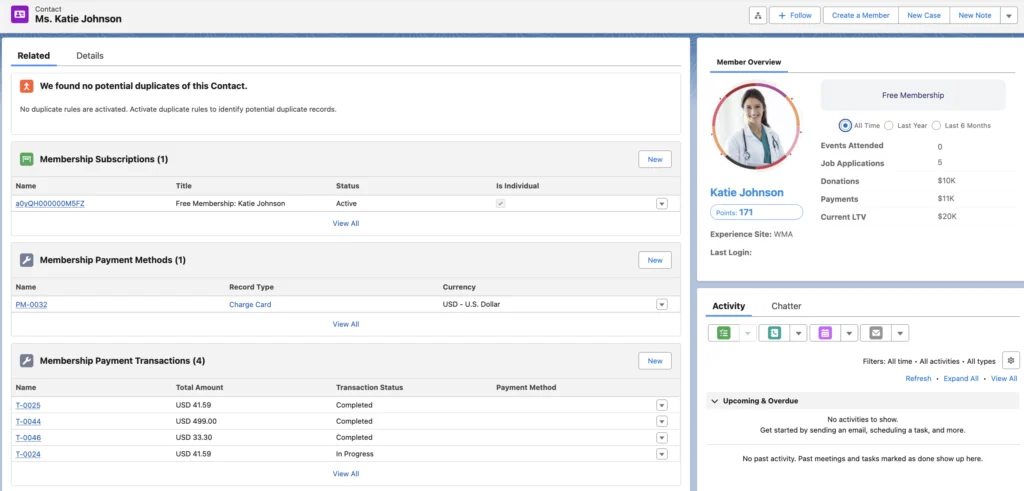
The practical intent behind that approach is straightforward: fewer custom layers between the association and the platform means fewer things to maintain, fewer things to revisit at upgrade time, and more of the system available to a non-technical admin using standard Salesforce tools. It is an architectural choice with an operating consequence, not a claim of superiority based on being newer. For how it lines up against other options in this category, the Salesforce AMS comparison covers the field in more detail.
Final Takeaway
The strongest evaluation question isn’t which Salesforce AMS has the longest feature list. It’s which architecture can support your operating model at an acceptable level of complexity over the next five to ten years.
Feature gaps get closed. Architecture rarely gets rebuilt. Spend your evaluation time on the part that’s hard to change later.
Not sure what’s really under the hood of the Salesforce AMS options you’re comparing?
Take a closer look at how AC MemberSmart is built on Salesforce, or talk to our team about your current architecture and where you expect your requirements to go next.