



Most associations aren’t short on data. They have membership records, payment history, event registrations, and engagement metrics scattered across platforms. The problem isn’t the data; it’s that without regular, structured reporting, that data sits in silos and leadership relies on intuition rather than evidence.
Association managers who review a consistent set of Salesforce reports every month can spot retention risks before renewals lapse, identify disengaged members before they cancel, and allocate resources toward programs that actually drive growth. This guide covers the eight essential reports, what each should show, and what actions to take.
Table of Contents
Why Monthly Reporting Matters
Membership is not static. Every month, new members join, existing members renew (or don’t), engagement levels shift, and revenue fluctuates. If your team is only reviewing data quarterly or only when something goes wrong, you’re always playing catch-up.
Here’s what a monthly reporting rhythm helps you catch early:
- Membership churn early. A drop in renewal rates often starts subtly; monthly data lets you intervene before the trend compounds.
- Engagement decline. Gradual drops in portal logins, email opens, and event attendance are early warning signs of cancellation risk.
- Revenue anomalies. Failed payments and outstanding invoices are easier to address when caught within the same month.
- Campaign effectiveness. See which acquisition channels are working so you can redirect budget in real time.
- Operational bottlenecks. Spikes in support cases may signal problems in onboarding or your member portal.
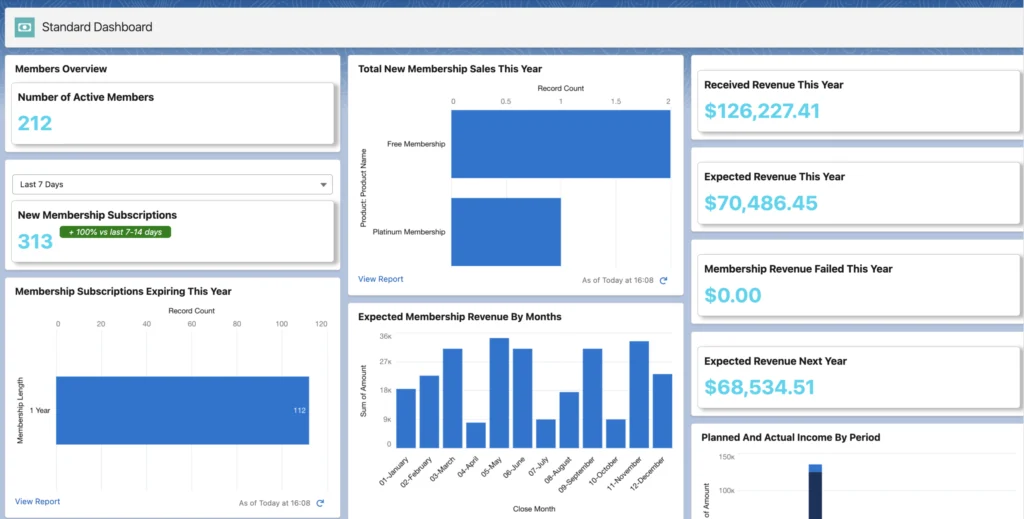
The goal is to move from reactive management to proactive decision-making. These eight reports are the foundation of that shift.
1. New Member Growth Report
Your New Member Growth Report is the starting point for understanding how your organization is expanding. It tells you not just how many new members joined, but where they came from and why they joined.
What This Report Should Show
- New members acquired this month, by membership type and acquisition source
- Month-over-month and year-over-year growth trend
- Conversion rate by channel (if lead tracking is in place)
What to Do With It
- Invest more in your highest-performing acquisition channels
- Spot seasonality patterns and plan outreach accordingly
- Evaluate campaign ROI. If source tracking is missing, fixing that is your first priority
- Feed insights into your broader membership sales strategies to replicate what’s working
If you don’t have reliable source tracking in Salesforce, this report will also reveal that gap, and fixing it is one of the highest-leverage improvements you can make.
2. Membership Renewal Report
Renewals are the financial backbone of most associations. A well-structured Renewal Report in Salesforce tells you who has renewed, who hasn’t yet, who is at risk, and how much revenue is at stake.
What to Track
- Members with renewals due in the next 30, 60, and 90 days
- Already-lapsed members and overall renewal rate vs. prior year
- Revenue tied to upcoming renewals, broken down by membership tier
- Breakdown by membership tier or category
- Revenue tied to upcoming renewals
What to Do With It
- Trigger automated reminders for members approaching their renewal date
- Prioritize personal outreach for high-value or long-tenured members showing non-renewal signs
- Review and refine your membership renewal strategy based on what your data shows
- Build a win-back sequence for recently lapsed members
3. Member Engagement Report
The renewal rate tells you what happened. Engagement tells you what’s about to happen. Members who are actively engaged, attending events, logging into your portal, and participating in communities are far more likely to renew. Members who have gone quiet are at risk, whether they know it or not.
What This Report Should Show
- Portal login frequency (active vs. inactive users)
- Event attendance history, group/community participation, content downloads
- Content downloads or resource access
- Email open and click-through rates (if your email tool is integrated with Salesforce)
What to Do With It
- Segment members into active, moderately engaged, and inactive groups
- Run targeted re-engagement campaigns for inactive members
- Apply proven member engagement strategies based on the segments you identify
- Personalize communications based on each member’s actual behavior
Engagement data is most powerful when it’s connected to membership status and renewal timing. That connection between behavior and retention is what separates associations with strong retention from those constantly chasing lapsed members. A well-maintained membership database that tracks engagement signals alongside contact and payment data is essential for making this report work at scale
4. Event Participation Report
For most associations, events are the primary vehicle for member value delivery. Your Event Participation Report helps you understand which events are resonating and which aren’t pulling their weight.
What to Track
- Registrations and actual attendance per event, plus no-show rate by event type
- No-show rate by event type
- Revenue per event (paid vs. free) and repeat-participant rate
- Repeat participants (members who attend regularly)
- Non-member registrations as potential acquisition leads
What to Do With It
- Identify your highest-attendance formats and replicate them
- Flag members with declining event attendance as potential at-risk. Compare attendance patterns to renewal behavior: members who stopped attending 6–12 months before renewal are a reliable churn signal
- Evaluate whether paid events are meeting revenue targets
- Use non-member attendee data to fuel prospecting
A useful lens: compare event attendance patterns to renewal behavior. Members who stopped attending events 6–12 months before their renewal date are a reliable signal of future churn. Once you can see that pattern in Salesforce, you can intervene much earlier.
5. Payment and Revenue Report
Association managers don’t need to be accountants, but they do need to understand the financial health of membership operations. Your Payment and Revenue Report gives you a clear view of what’s been collected, what’s outstanding, and where revenue is leaking.
What This Report Should Show
- Total dues revenue collected in the current month
- Event payments and ancillary revenue
- Failed or declined payments
- Outstanding invoices and aging balances
- Refunds and credits issued
- Donations (if applicable)
What to Do With It
- Follow up immediately on failed payments (many are recoverable with a single reminder)
- Forecast next month’s expected revenue based on upcoming renewals
- Flag members with outstanding balances before their renewal comes due
- Use revenue trends to inform growth membership with Salesforce insights and budget planning
This report is particularly valuable when it’s connected to your membership and renewal data, so a failed payment automatically flags a member as a renewal risk, not just a billing issue.
6. Member Support / Case Report
Every association has member-facing questions and support requests. Your Case Report surfaces patterns in those requests that are easy to miss when you’re handling them one at a time and those patterns often point directly to fixable problems.
What to Track
- Volume of support cases or inquiries submitted each month
- Case types and most common topics
- Average response and resolution time
- Unresolved or escalated cases
- Recurring issues that appear repeatedly
What to Do With It
- If the same question appears repeatedly, update your FAQ, member portal, or onboarding materials
- Use response time data to identify staffing or process gaps
- Track whether certain member segments generate disproportionate support volume
- Treat recurring issues as product feedback. They often point to UX problems in your portal or gaps in onboarding
The insight from this report doesn’t just help your support team; it helps your entire organization understand where the member experience is falling short. Sometimes a spike in cases about a specific topic is the clearest signal you’ll get that something needs to change.
7. At-Risk Members Report
This is arguably the most strategically important report on this list. The At-Risk Members Report combines engagement, renewal, and behavioral data to surface members who are likely to churn before they actually do.
What This Report Should Show
- Members who have not logged into the portal in 60+ days
- Members who have not attended an event in the last 6 months
- Members who have not opened an email in several months
- Members with a renewal coming in the next 60–90 days AND low engagement scores
- Long-tenured members who have recently gone inactive (a particularly valuable segment)
What to Do With It
- Prioritize personal outreach: a phone call or personalized email from staff often makes a significant difference
- Offer value-add resources, access to an upcoming event, or a check-in conversation
- Flag these members in Salesforce so the entire team is aligned on who needs attention
More advanced implementations can incorporate predictive scoring, weighting different engagement signals to calculate a churn probability for each member. Even without AI-powered membership analytics, a well-built Salesforce report that combines login activity, event attendance, email behavior, and renewal timing gives your team a highly actionable shortlist to work from each month.
8. Campaign and Referral Performance Report
Your acquisition is about understanding which channels and campaigns produce members who stay. The Campaign and Referral Report connects your marketing activity to actual membership outcomes.
What to Track
- Leads and conversion rate per campaign. Referral volume and conversion rate
- Cost per acquisition by channel (if budget data is in Salesforce)
- Referral activity (who is referring, how many referrals convert)
- Campaign-specific retention rate: Do members from Campaign A renew at higher rates than Campaign B?
What to Do With It
- Reallocate budget toward campaigns that produce high-converting, high-retention members
- Build a structured referral program if referral conversion rates are strong
- Identify which messaging or value propositions resonate most with new members
- Layer in AI-powered engagement strategies to further personalize acquisition and nurture sequences
This report ties directly to your growth trajectory. Associations that track campaign-to-member conversion consistently grow faster, not because they spend more, but because they know what’s working and do more of it.
Building a Monthly Salesforce Dashboard for Associations
These eight membership reports are most powerful when organized into a single dashboard reviewed at the same leadership meeting each month. Recommended structure:
- Membership Health: New member growth, renewal pipeline, lapsed count
- Engagement Overview: Active vs. inactive members, event attendance, portal logins
- Financial Summary: Dues collected, outstanding invoices, failed payments
- At-Risk Members: Low-engagement members with renewals in the next 90 days
- Acquisition & Campaigns: New leads, conversions, referral activity
- Support Operations: Open cases, response times, recurring issues
Monthly Report Summary
| Report | Main Association KPIs | Who Reviews It | Action to Take |
|---|---|---|---|
| New Member Growth | New members by month & source | Membership Director, Marketing | Double down on top channels. Adjust campaigns |
| Membership Renewal | Renewal rate, lapsed count, pipeline | Membership Director, CEO | Automate reminders. Launch win-back campaigns |
| Member Engagement | Active vs. inactive, login rate | Membership Director, Programs | Segment comms. Flag at-risk members |
| Event Participation | Registrations, attendance, no-shows | Events Manager, Programs | Replicate high-attendance formats. Improve follow-up |
| Payment & Revenue | Dues collected, failed payments | Finance, Operations | Chase failed payments. Forecast cash flow |
| Member Support / Cases | Open cases, response time, recurring issues | Operations, Support | Fix systemic issues. Improve onboarding |
| At-Risk Members | Low-engagement members near renewal | Membership Director, CEO | Trigger personal outreach. Offer value-add resources |
| Campaign & Referral | Lead-to-member conversion, referrals | Marketing, Membership Director | Scale top campaigns. Reward referrers |
How AC MemberSmart Helps Associations Turn Data Into Action
Building these reports consistently requires membership, payment, event, and engagement data in one connected system. When data is fragmented across spreadsheets and separate platforms, reporting becomes a manual effort, and manual reporting rarely happens consistently.
AC MemberSmart is a Salesforce-native membership management platform. Because it operates entirely within Salesforce, every piece of member data (dues payments, event registrations, portal logins, support cases, committee participation) flows into the same system automatically.
- Renewal automation: Reminders and sequences are triggered based on Salesforce data, not manual calendar management
- Engagement tracking: Portal activity, event participation, and content engagement are recorded in the member record automatically
- Payment management: Failed payments, outstanding invoices, and dues history are visible alongside membership status and renewal data
- Reporting flexibility: Use standard Salesforce report builder tools to slice and filter data however your team needs
Conclusion
Associations that grow consistently treat data as a core operational tool. The eight reports here are not just metrics for the sake of metrics. Each one of them drives specific decisions: who to reach out to, which campaigns to scale, where the member experience is breaking down, and where revenue is at risk.
If your association already uses Salesforce, most of this data is already there. The work is in structuring it, reviewing it consistently, and making sure insights reach the people who can act on them. Start with the reports that address your most pressing challenge (retention, engagement, or acquisition). Add the others as your reporting cadence matures.
Ready to connect your membership, renewal, payment, event, and engagement data inside Salesforce?
Book a personalized AC MemberSmart demo and see how your association’s data can work together in one place.
FAQ
Do I need a Salesforce Admin to build these reports?
Not necessarily. Many can be built using Salesforce’s standard report builder with basic training. Complex reports involving cross-object data may benefit from admin involvement. If you use a Salesforce-native platform like AC MemberSmart, many come pre-built.
How often should these reports be reviewed?
Monthly is the recommended baseline for all eight. The At-Risk Members and Payment & Revenue reports may warrant weekly review for larger organizations. Consistency matters most: reviewing the same reports at the same time each month outperforms sporadic deep dives.
What if our engagement data isn't in Salesforce?
If your email platform, event tool, or member portal isn’t integrated with Salesforce, engagement reporting will be incomplete. The solution is either a Salesforce-native platform that centralizes this data or building integrations between your existing tools and Salesforce.
Can Salesforce predict which members will churn?
Standard reports can surface at-risk members based on behavioral signals. Predictive scoring using Einstein Analytics or custom models is possible, but requires more configuration. For most associations, a well-built At-Risk Members report provides a sufficient signal to take meaningful action.
How does data quality affect reporting?
Significantly. Duplicate records, inconsistent field values, and incomplete contact information reduce accuracy across every report. Investing in data hygiene, standardized field values, and clear entry protocols directly improves reporting quality.